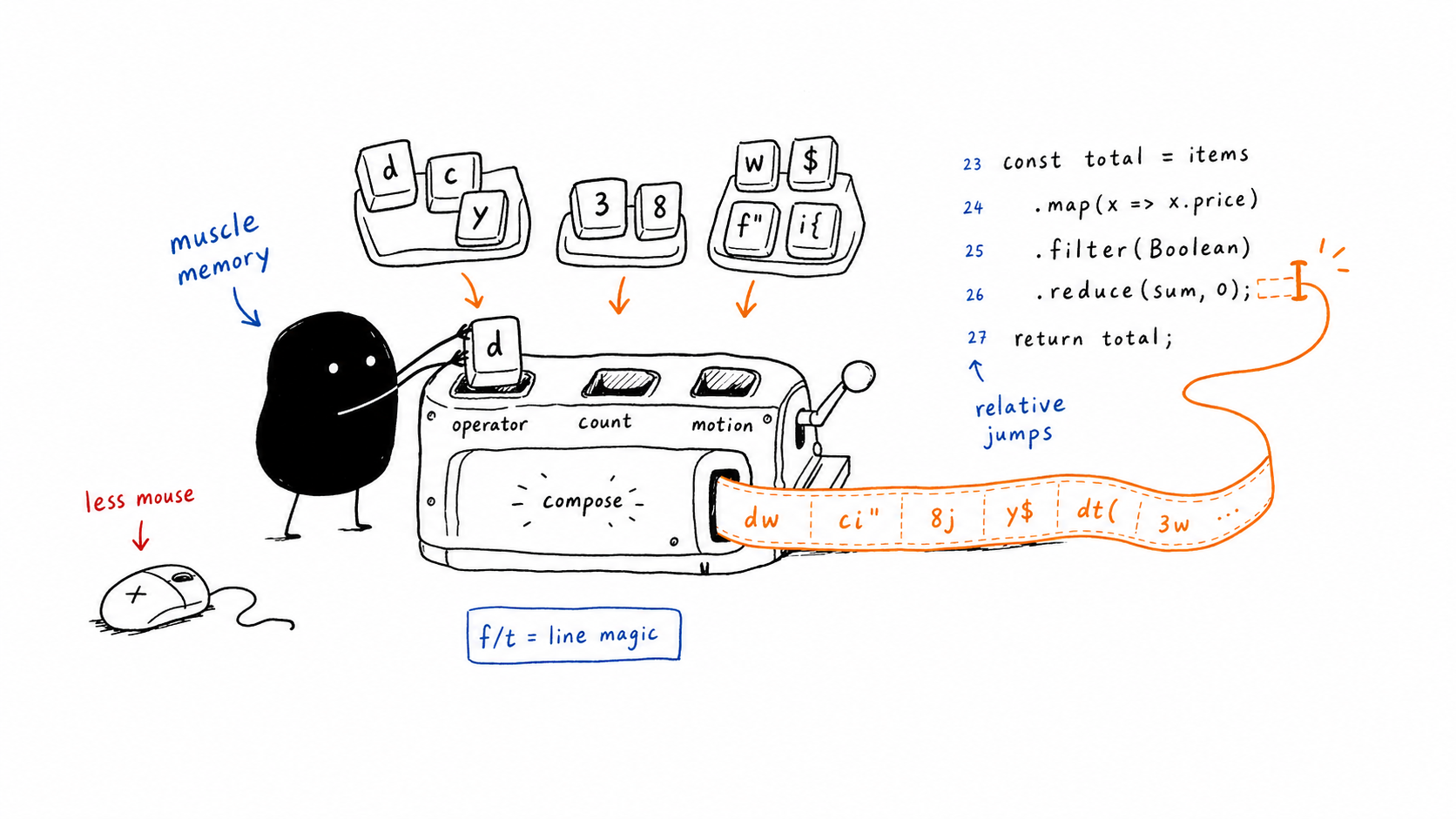
vimmers love giving you a list of 200 keybindings. most of them you’ll never use. these are the ones that actually live in my muscle memory.
navigation
basic movement
h  j  k  l     — left, down, up, right
w  b           — forward/backward by word
0  _  $        — start of line, first char, end of line
gg  G          — top of file, bottom of file
:[line]        — jump to line number
half-page jumps
ctrl+d         — half page down
ctrl+u         — half page up
when you don’t have a specific target, these are faster than counting lines.
paragraph jumping
{ } — up/down by paragraphparagraph = block of text separated by blank lines. works surprisingly well in code.
relative line jumps
[count]j       — down 8 lines (8j)
[count]k       — up 5 lines (5k)
turn on relativenumber. the line numbers tell you exactly how many lines to jump. no mental math. tree-sitter context makes this even better — 18k lands you on the function definition directly.
horizontal motion
the real speed comes from moving on the same line without reaching for w or b.
f[char]        — jump forward TO the character
t[char]        — jump forward BEFORE the character
F[char]        — jump backward TO the character
T[char]        — jump backward BEFORE the character
;              — repeat last f/t forward
,              — repeat last f/t backward
example: you’re on a line and need to delete everything up to a closing quote. dt" — delete till ". done.
the operator + motion language
this is the thing that makes vim actually click. every command is:
[operator] + [count] + [motion]the operators you’ll use daily:
d              — delete
c              — change (delete then enter insert mode)
y              — yank (copy)
v              — visual select
now combine them with motions:
delete + motion
d$             — delete from cursor to end of line
d0             — delete from cursor to start of line
dw             — delete one word forward
db             — delete one word backward
d3w            — delete 3 words forward
d2j            — delete current line + 2 below
dt)            — delete until before )
df)            — delete up to and including )
d/foo          — delete until first occurrence of "foo"
dap            — delete around paragraph
di{            — delete inside curly braces
da{            — delete a block including braces
change + motion
cw             — change one word forward
c3w            — change 3 words forward
ciw            — change inner word (works anywhere in the word)
ci"            — change inside double quotes
ci(            — change inside parentheses
ca(            — change around parentheses (removes them too)
ct,            — change until before comma
cf,            — change up to and including comma
c$             — change from cursor to end of line
C              — same as c$ (built-in shortcut)
cc             — change entire line
yank + motion
yw             — yank one word
y3w            — yank 3 words
yt"            — yank until before "
yf"            — yank up to and including "
yi(            — yank inside parentheses
ya{            — yank around braces (includes the braces)
yap            — yank around paragraph
y$             — yank from cursor to end of line
yy             — yank entire line
once you get this pattern you stop memorizing commands and start composing them. d is delete. c is change. y is yank. then you just pick the motion. the same motions work with all three operators — dw deletes a word, cw changes it, yw copies it. same motion, different outcome.
text objects
iw             — inner word
i(  i{  i[    — inside parentheses, braces, brackets
i'  i"         — inside quotes
a(  a{  a[    — around (includes the brackets)
ip  ap         — inner/around paragraph
combine with operators: ci( changes everything inside parentheses. da{ deletes the whole block with braces. yap yanks the whole paragraph.
the trick: vi{ then escape jumps you to the bottom of the block. select inside braces, exit visual — cursor is at the end of the function. way faster than scrolling.
editing
dd             — delete line
D              — delete from cursor to end of line
yy             — yank (copy) line
p              — paste after cursor
u              — undo
ctrl+r         — redo
==             — auto-indent line
=ap            — auto-indent paragraph
modes
i              — insert before cursor
a              — insert after cursor
I              — insert at start of line
A              — insert at end of line
o              — open new line below
O              — open new line above
v              — visual mode (char selection)
V              — visual line mode
ctrl+v         — visual block mode
esc / ctrl+c   — back to normal mode
replace without clobbering your register
leader + p — paste without overwriting clipboardin visual mode, this deletes the selection into the void register and pastes. your yanked text stays untouched. i remapped this and never looked back.
search
/[pattern]     — forward search
?[pattern]     — backward search
n  N           — next / previous match
*              — search word under cursor forward
#              — search word under cursor backward
increments
ctrl+a         — increment number under cursor
ctrl+x         — decrement
works on dates, hex, everything. gaa increments all numbers in a selection if you need to renumber a list.
bracket hopping
% — jump between matching bracketcursor on {, press %, you’re on }. works for (), [], {}.
netrw / file tree
:Lex           — open file explorer
vim .          — open current directory
no plugin needed. netrw ships with vim and it’s fine. but honestly i just use a fuzzy finder most of the time.
that’s it. not 200 commands. maybe 40 that actually matter. learn these and you’ll stop reaching for the mouse. the rest is just showing off.