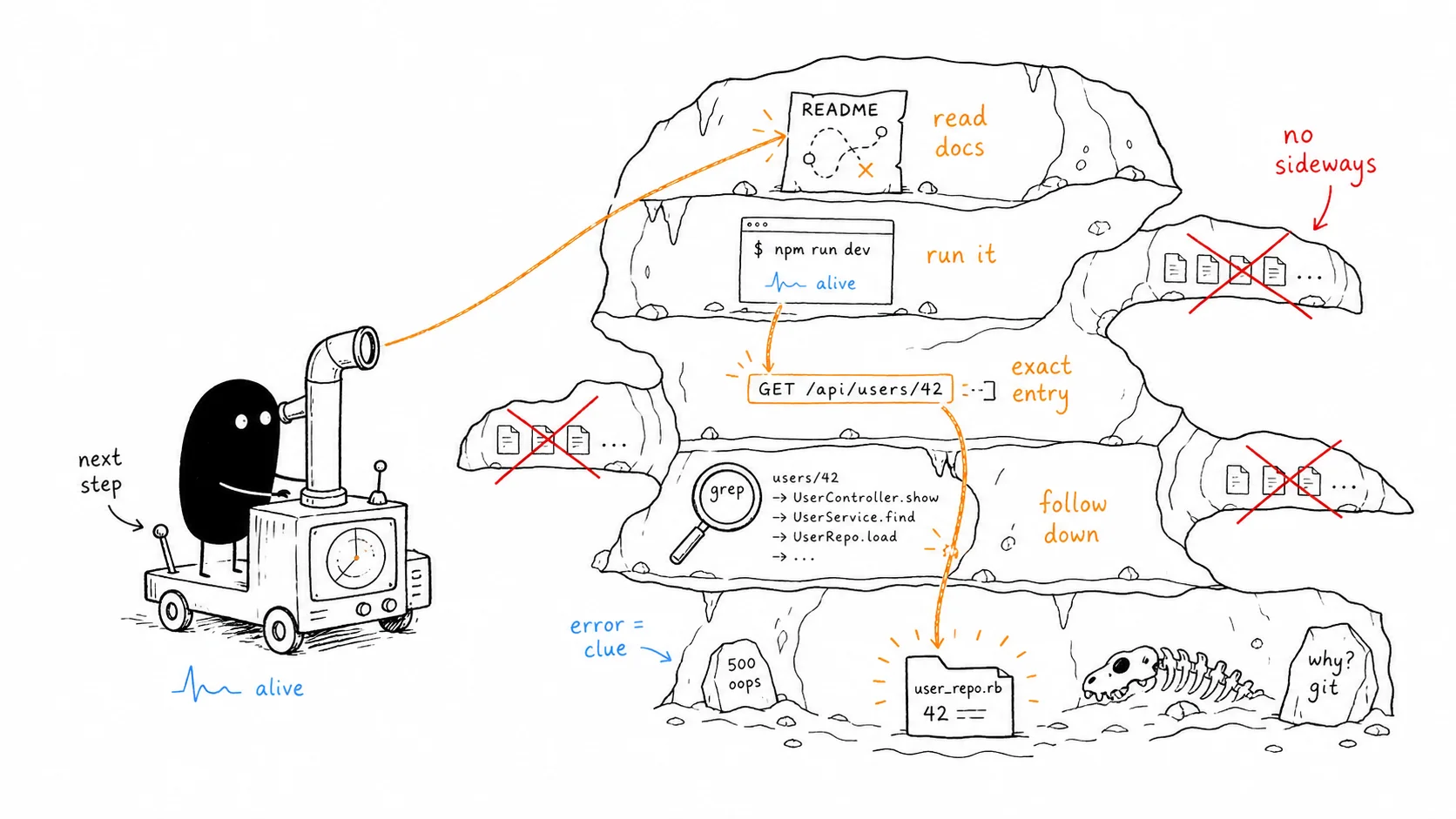
i’ve navigated enough unfamiliar codebases to have a repeatable method. it works whether the project is a 3-file express API or a 200-module monorepo like cal.com.
the method is: orient, run, locate, dig. in that order. never skip a step.
every codebase feels overwhelming at first. not because it’s complicated, but because you don’t know where to look. the instinct is to start reading files. that’s the wrong move. reading without orientation is noise. you need a map before you navigate, and you need to run the thing before you trust your map.
orient
orientation is not reading code. it’s reading everything written for someone who hasn’t seen the code yet. do this first, before you open a single .ts or .go file.
read the README, then the contribution guide
the README tells you what the project is. the contribution guide tells you how to work with it. they’re different documents with different audiences.
the contribution guide is written for strangers: developers who just showed up and need to get the project running without asking anyone. it explains the setup steps, the folder conventions, the things the README assumes you already know. that’s exactly who you are right now.
if there’s no CONTRIBUTING.md, look for a docs/ folder or a project structure section inside the README. some projects put everything in one place. either way, find it and read it before touching anything else.
find the entry point
once you have the lay of the land from the docs, find where the code actually starts. this is language-dependent and once you know the pattern for each language it takes about thirty seconds.
node / typescript
look for index.ts or index.js at the root or inside a src/ folder. if it’s a monorepo, don’t try to understand everything at once. go into apps/ or packages/, find the main application, and start there. the other packages will make sense once you understand the core.
go
open go.mod first. the dependencies tell you what the project leans on before you read a single function. if it imports gin, it’s an HTTP server. if it imports urfave/cli, it’s a CLI tool. you know the shape of the project before you’ve read any application code.
rust
look for crates/ at the root. start with the top-level crate, the one that owns main.rs or lib.rs. the workspace structure will tell you how the project is divided and which crate is the one you actually care about.
read the entry point
once you’ve found the entry point file, open it and look for two things depending on what kind of project it is.
for a backend: what routes are registered. the route list is a table of contents for the entire API. you can see every capability the server exposes in one place without reading any of the implementations.
for a frontend: what pages or components are mounted at the top level. in a Next.js project, the app/ or pages/ directory is itself the route map. the folder structure is the answer.
read package.json scripts
always do this, even if the project isn’t JavaScript. if there’s a package.json, its scripts section is a map of how the team thinks about operating the project.
{
  "scripts": {
    "dev": "next dev",
    "db:migrate": "prisma migrate dev",
    "db:seed": "ts-node prisma/seed.ts",
    "db:studio": "prisma studio",
    "test": "vitest"
  }
}
from this alone you know: it’s a Next.js app, it uses Prisma, you can seed and migrate the database without reading any code, and the test runner is vitest. scripts are more useful than most documentation because they’re always up to date. they have to be, or nothing works.
run
you’ve oriented. you have a mental map. now run the project. the goal is not to fully understand it. it’s to prove it works so you have a working baseline to return to.
hit the health endpoint
try the simplest possible thing first. for a backend, hit the health endpoint:
curl http://localhost:3000/healthfor a frontend, just load localhost:3000 and see if it renders without crashing. you’re not testing features. you’re confirming the project is alive.
it won’t work first try
that’s normal. don’t treat it as a failure. something will always be missing: a build tool you don’t have installed, an env var that isn’t in the example .env, a dependency on a local service like Redis or Postgres that isn’t running.
look at the error, figure out what’s missing, set it up, and try again. the loop is: run → error → fix → run. expect to go around it two or three times before it starts.
how to read errors
this is where most developers lose time. they skim the error, misread it, and chase the wrong thing.
read the error 3-4 times before you do anything. every time. errors contain more than they appear to at first glance. the second read usually catches something the first missed.
stack traces
if there’s a stack trace, don’t start at the top. go to the last frame that points to your source code, not node_modules, not the runtime internals. your actual application code.
Error: Cannot read properties of undefined (reading 'id')
    at getUserById (src/services/user.ts:42:18)   ← this one
    at processRequest (node_modules/express/lib/router/layer.js:95:5)
    at next (node_modules/express/lib/router/route.js:137:13)
node_modules is where the error surfaced. your source is where it started. src/services/user.ts:42 is the line worth reading. go there first.
locate
the project is running. you have a baseline. stop exploring now.
run your feature before touching it
if you have a feature assigned, go use it before you write a line of code. click through the flow. see what it does. see what the data looks like. observe every state: the happy path, what happens when something’s missing, what happens on error.
this is not optional. you cannot know if you broke something if you don’t know what it did before you touched it. the two minutes you spend here will save you an hour of debugging something you accidentally changed.
three ways to find the code
you know what the feature does. now find where it lives in the code. three strategies, in order of speed.
use AI
if you have an AI coding assistant available, describe the feature and ask where it lives. give it the route, the UI label, the behavior, whatever you observed. this is the fastest path by a wide margin when it works.
use the URL (frontend projects)
this is what i did with documenso. my job was to understand how their document activity logs worked, how signatures were stored, how e-signatures were verified. i didn’t grep blindly. i logged into the platform, navigated to the exact page i needed to understand, and copied the URL from the browser.
in a Next.js project, the URL maps directly to a file:
URL:  /documents/123/activity
File: app/documents/[id]/activity/page.tsx
open that file. you’re already exactly where you need to be, without searching for anything.
if the URL doesn’t map cleanly to a file path, search a unique string from the UI: a heading, a button label, an error message. something like "Enter your credentials to access your account" only exists in one place in the codebase. grep for it across the whole project and you land in the exact component.
grep (backend or no frontend)
if there’s no frontend, search based on what the task is about. the key is to try multiple naming conventions because projects aren’t consistent:
# modifying lead creation? try all of these:
grep -r "createLead" src/
grep -r "create_lead" src/
grep -r "leads" src/controllers/
grep -r "leads" src/routes/
if the codebase has API documentation (Swagger, Postman, even a markdown file), read it before grepping. API docs tell you the exact endpoint name and path, which makes your grep specific instead of exploratory. they do most of the orientation work for you.
dig
follow the call chain down
start from the exact route handler or exact component you located. follow the call chain downward from there. not the whole file. just what this feature calls, what those functions call, and so on.
the discipline here is: don’t read sideways. adjacent functions in the same file are not your business unless the feature actually touches them. reading them is procrastination that feels like work.
one level at a time. entry point → service → repository → database query. or page → server action → db call. whatever the stack looks like, follow it top to bottom along the path the feature actually takes.
when something doesn’t make sense
you’ll hit a function whose purpose isn’t obvious. a pattern you haven’t seen. an abstraction that doesn’t explain itself. here’s the order to resolve it.
find other usages first
before you do anything else, find other places in the codebase that call the same function. usage reveals meaning without needing docs or comments. it works the same way as understanding a word you don’t know from its context in a sentence. you don’t need the dictionary, the sentence tells you.
grep -r "functionName" src/look at two or three call sites. see what arguments get passed, what the caller does with the result, what context it’s used in. most of the time this is enough.
git blame and git log
if usage doesn’t resolve it, git blame the confusing line:
git blame src/services/documents.tsthis shows you who added each line and when. more importantly, it gives you the commit hash. click it or run git show <hash> and read the commit message. the commit message explains the why that the code itself will never tell you.
for a deeper trace, use git log --follow:
git log --follow src/services/documents.tsthis traces the full history of a file, even through renames and moves. you’ll often find a commit from two years ago that says “refactor: extract signature verification into its own service.” suddenly the reason the code is structured this way makes sense.
code tells you what. git tells you why.
google, then ask
if usage and git history still leave you stuck, google the pattern or the library. look for the concept, not just the error message.
only after genuinely trying all three (usages, git, google) ask a teammate. by the time you ask, you’ve built enough context that the conversation is fast. you’re not walking up and saying “what does this do.” you’re saying “i found this function, i read how it’s used in three places, i checked the commit history, and i still don’t understand why it does X instead of Y.” that’s a question a senior engineer can answer in thirty seconds because you’ve already done the work.
asking too early means you learn nothing and you’ll be back with the same question. asking too late wastes your own time. the three-stage escalation (usages, git, google) gives you a natural stopping point before reaching out.
the full sequence
orient → run → locate → dig.
read docs before you read code. run it before you trust your mental map. find the exact entry point for your feature before you read anything else. follow the call chain down, not sideways. let git explain what the code won’t.
the time most developers spend feeling lost in a new codebase is time spent reading the wrong thing in the wrong order. the method is just a way to always know what to read next, and why.
worked through this process on documenso, cal.com, and a few other large codebases. it holds up regardless of size.