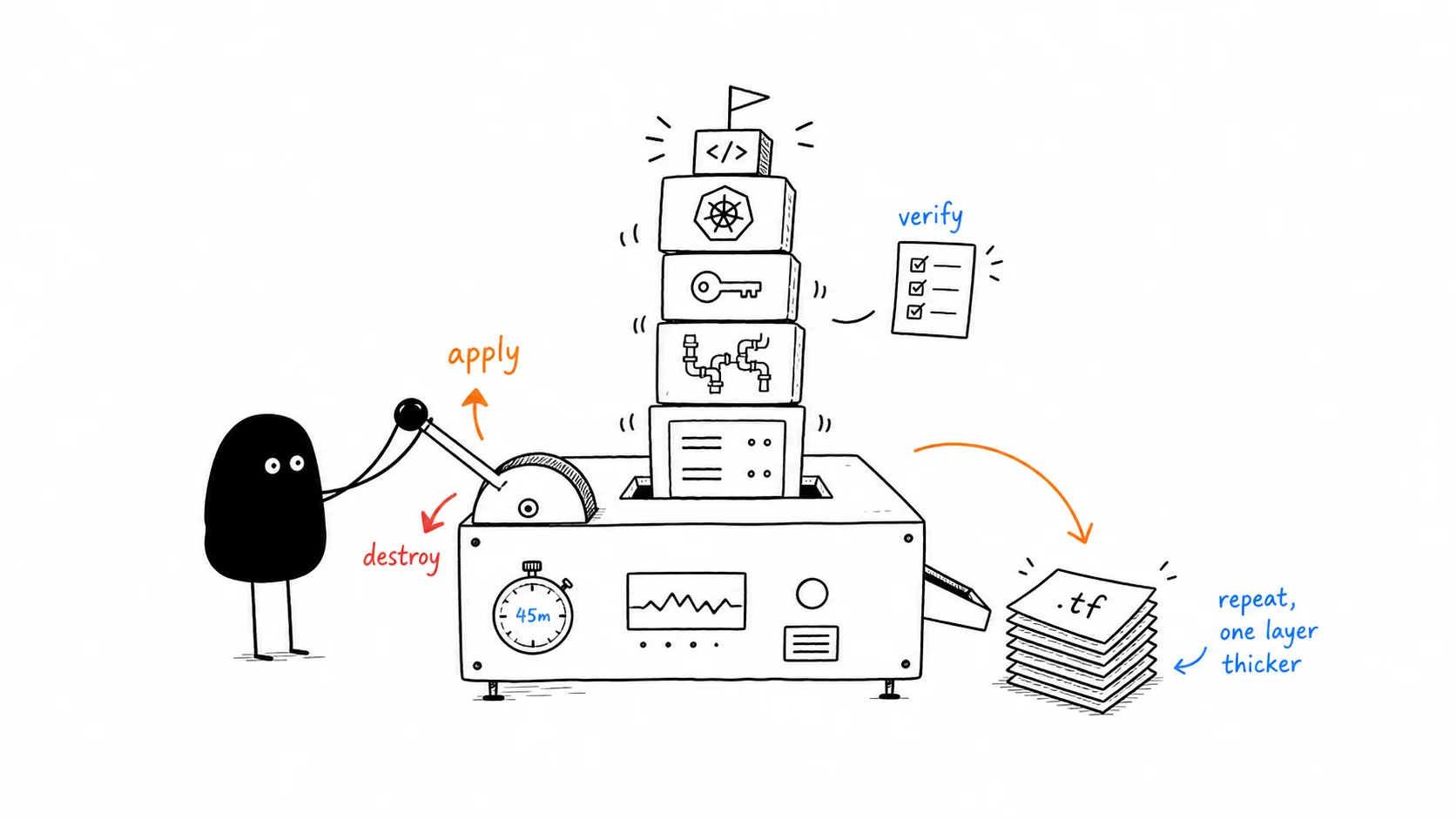
i learned terraform by building things and immediately destroying them. not reading docs cover-to-cover. not watching hours of tutorials. write .tf files, terraform apply, verify it works, terraform destroy. repeat five times, each time on a thicker layer. total cost across the entire week: about two dollars. total time spent in the AWS console: zero.
i’d been clicking around the AWS console for long enough. ec2, security groups, ecs. i knew the services but every setup was manual. click through a wizard, pick a vpc from a dropdown, hope i remembered to tag everything. i’d used SST before, which sits on top of Pulumi and wraps infrastructure in TypeScript. so i understood the idea: declare what you want, let a tool reconcile it. but never touched terraform itself. the goal: provision a full EKS kubernetes cluster from .tf files, deploy a Hono server to it, and never open the AWS console.
five things i built and destroyed that week: a single ec2 instance. a vpc with public and private subnets across two availability zones. iam roles wired to aws managed policies. an eks cluster with managed node groups. a hono server deployed to that cluster.
the final project structure:
~/terraform-playground/eks-hono/
├── terraform.tf       # three providers: aws, kubernetes, tls
├── variables.tf       # cluster_name, AZs, instance_type, node count
├── vpc.tf             # VPC, 2 public + 2 private subnets, IGW, 2 NAT GWs, route tables
├── iam.tf             # cluster role + node role + 4 managed policy attachments
├── eks.tf             # EKS cluster v1.32, managed node group, OIDC provider
└── outputs.tf         # cluster endpoint, kubeconfig command
and the app:
~/portfolio/hono-server/
├── src/index.ts       # 30 lines: two endpoints, no framework fluff
├── package.json       # hono + @hono/node-server, built with bun
├── Dockerfile         # multi-stage, but hit exec format error (arm64 vs x86)
├── k8s-deployment.yaml  # 2 replicas, ConfigMap mount, ClusterIP service
└── dist/index.js      # 67KB self-contained bundle — all deps inlined
the four commands you need
terraform has a lot of concepts. provider, resource, data source, state, module, backend. but the workflow comes down to four commands you’ll type hundreds of times.
init, plan, apply, destroy
terraform init downloads providers and sets up the working directory. run it once when you clone a project. terraform plan shows what will change before anything happens: green + means create, yellow ~ means update, red - means destroy. always read the plan. terraform apply executes it, shows the plan again, asks for confirmation. terraform destroy tears everything down in thirty seconds and your aws bill stops climbing.
there’s no “terraform server” running. no agent watching your infrastructure. it’s a cli binary that runs, does its job, and exits. infrastructure only reconciles when you run it. this took me an embarrassingly long time to realize.
files merge, state maps
one thing that would have saved me confusion: all .tf files in a directory merge into one config. main.tf, vpc.tf, iam.tf is just a convention for humans. terraform sees them as one. a resource defined in vpc.tf is automatically visible in main.tf. no imports needed.
the rest is syntax. provider blocks configure which cloud you’re talking to. resource blocks declare what you want. data source blocks look up things that already exist. state is a json file mapping your hcl names to real aws resource ids. never commit state to git. it has sensitive data and belongs in s3 with dynamodb locking when you’re working with a team. for solo learning, local state is fine.
an ec2 instance, but from a text file
writing it
first real thing i built: a single ec2 instance running ubuntu. t3.micro, free tier. the config was maybe forty lines:
# main.tf — my first terraform resource
terraform {
  required_version = "~> 1.13"
  required_providers {
    aws = { source = "hashicorp/aws", version = "~> 5.0" }
  }
}

provider "aws" { region = "us-east-1" }

data "aws_ami" "ubuntu" {
  most_recent = true
  owners      = ["099720109477"] # canonical's aws account
  filter { name = "name"; values = ["ubuntu/images/*-22.04-amd64-server-*"] }
}

resource "aws_security_group" "ssh" {
  name        = "terraform-ssh"
  description = "Allow SSH from my IP"
  ingress { from_port = 22; to_port = 22; protocol = "tcp"; cidr_blocks = ["0.0.0.0/0"] }
  egress  { from_port = 0;  to_port = 0;  protocol = "-1"; cidr_blocks = ["0.0.0.0/0"] }
}

resource "aws_instance" "web" {
  ami           = data.aws_ami.ubuntu.id
  instance_type = "t3.micro"
  vpc_security_group_ids = [aws_security_group.ssh.id]
  tags = { Name = "terraform-first-instance" }
}
a data source to look up the latest ubuntu ami. a security group. the instance referencing both. two resources, one data source, forty lines. typed terraform init and watched it download the aws provider for the first time.
terraform init
terraform fmt
terraform validate
terraform plan
terraform apply
terraform plan showed two resources: the security group and the instance. green + symbols. all the attributes terraform knew, plus a bunch marked (known after apply). values it couldn’t compute yet, like the public ip. typed yes. about thirty seconds later:
Apply complete! Resources: 2 added.

Outputs:
instance_id = "i-06a15fdd0515ee4d5"
public_ip = "98.91.190.222"
opened the aws console. ec2 → instances. there it was. terraform-first-instance. running. this is the moment. an instance i hadn’t clicked to create. no launch wizard. no security group dropdown. no manual subnet. just a .tf file and four commands.
the edit loop
then i made a change. added a Name tag to the security group. terraform plan showed ~ update in-place. the ~ means modify without recreating. terraform apply. tag added. no destruction, no downtime. this is the loop. edit .tf → plan → apply. you do this hundreds of times.
state and destroy
ran terraform state list and terraform state show to inspect what terraform knew. the state file is fascinating: a json document mapping aws_instance.web to i-06a15fdd0515ee4d5. every attribute, every tag, every network interface. this is how terraform knows which instance is yours. without state, it’s just a .tf file with no connection to reality.
then the important part: terraform destroy. thirty seconds. everything gone. check the console. instance terminated. this habit saved me real money later.
building a network that eks understands
17 resources, one file
eks needs a vpc. not the default one aws gives you. a custom one with public and private subnets across multiple availability zones, plus specific tags so eks knows which subnets to use for load balancers.
i built one. 17 resources in a single vpc.tf file: the vpc itself, two public subnets, two private subnets, an internet gateway, two nat gateways with elastic ips, a public route table, two private route tables, and four route table associations. applied in 2m37s.
                               internet
                                  │
                          ┌───────┴───────┐
                          │  Internet GW  │
                          └───┬───┬───┬───┘
                              │   │   │
              ┌───────────────┘   │   └──────────────┐
              ▼                   ▼                  ▼
        ┌──────────┐       ┌──────────┐        ┌──────────┐
        │ PUBLIC   │       │ NAT GW-a │        │ NAT GW-b │
        │ subnet   │       │  + EIP   │        │  + EIP   │
        │          │       └────┬─────┘        └────┬─────┘
        │ a: 10.0. │            │                   │
        │ 1.0/24   │            ▼                   ▼
        │          │       ┌─────────────────────────────────┐
        │ b: 10.0. │       │        PRIVATE SUBNETS          │
        │ 2.0/24   │       │                                 │
        │          │       │  a: 10.0.11.0/24  us-east-1a    │
        │ us-east-1│       │  b: 10.0.12.0/24  us-east-1b    │
        └──────────┘       │                                 │
                           │  (EKS worker nodes live here)   │
                           └─────────────────────────────────┘

     ┌──────────────────────────────────────────────────────────┐
     │                    VPC  10.0.0.0/16                      │
     │                                                          │
     │  subnet tags:                                            │
     │    kubernetes.io/cluster/hono-cluster = shared           │
     │    kubernetes.io/role/elb = 1           (public only)    │
     │    kubernetes.io/role/internal-elb = 1  (private only)   │
     └──────────────────────────────────────────────────────────┘
count and cidrsubnet
this is where count clicked. instead of writing four subnet blocks, you write one and let count = length(var.availability_zones) create copies. inside the block, count.index gives you 0, 1, 2. reference them with aws_subnet.public[0], aws_subnet.public[1]. the splat expression aws_subnet.public[*].id gives you all ids at once. clean.
cidrsubnet is the other thing. instead of manually typing cidr ranges and hoping they don’t overlap:
cidrsubnet("10.0.0.0/16", 8, 1)  → 10.0.1.0/24   # public-us-east-1a
cidrsubnet("10.0.0.0/16", 8, 2)  → 10.0.2.0/24   # public-us-east-1b
cidrsubnet("10.0.0.0/16", 8, 11) → 10.0.11.0/24  # private-us-east-1a
cidrsubnet("10.0.0.0/16", 8, 12) → 10.0.12.0/24  # private-us-east-1b
no manual cidr math. no overlap bugs. the function does it. public subnets get low numbers, private subnets get higher ones, a convention that makes the network topology readable at a glance.
tags eks needs
the eks tags are non-negotiable. you tag public subnets with kubernetes.io/role/elb = 1 and private subnets with kubernetes.io/role/internal-elb = 1. both get kubernetes.io/cluster/hono-cluster = shared. the vpc gets the cluster tag too. skip these and eks provisions but can’t find your subnets. load balancers sit in pending forever. you debug for an hour.
the nat gateway lesson
then i learned the nat gateway lesson. each one costs about $0.045 per hour. two running 24/7 is roughly $65 a month. for infrastructure you’re not using. i set a 45-minute timer. create them, verify the routing works, terraform destroy. the vpc console has a resource map view. watching 17 resources appear as a connected graph is deeply satisfying. then watching them all disappear: even better.
the cluster, for real this time
the eks project combined the vpc from layer two with three new files.
iam: two roles, four policies
iam.tf: two iam roles, one for the cluster control plane and one for worker nodes, each with aws managed policies attached. here’s the node role. the assume-role policy uses jsonencode() instead of raw json:
resource "aws_iam_role" "eks_node" {
  name = "hono-cluster-node"
  assume_role_policy = jsonencode({
    Version = "2012-10-17"
    Statement = [{
      Effect    = "Allow"
      Principal = { Service = "ec2.amazonaws.com" }
      Action    = "sts:AssumeRole"
    }]
  })
}

# three policies every node group needs
resource "aws_iam_role_policy_attachment" "eks_worker_node" {
  policy_arn = "arn:aws:iam::aws:policy/AmazonEKSWorkerNodePolicy"
  role       = aws_iam_role.eks_node.name
}
resource "aws_iam_role_policy_attachment" "eks_cni" {
  policy_arn = "arn:aws:iam::aws:policy/AmazonEKS_CNI_Policy"
  role       = aws_iam_role.eks_node.name
}
resource "aws_iam_role_policy_attachment" "eks_ecr_readonly" {
  policy_arn = "arn:aws:iam::aws:policy/AmazonEC2ContainerRegistryReadOnly"
  role       = aws_iam_role.eks_node.name
}
three aws managed policies. if you miss one, the node group sits in CREATING status forever. ask me how i know.
eks.tf: cluster and node group
eks.tf: the cluster resource, a managed node group with two t3.medium instances in private subnets, and an oidc provider for future irsa use:
resource "aws_eks_cluster" "main" {
  name     = "hono-cluster"
  role_arn = aws_iam_role.eks_cluster.arn
  version  = "1.32"

  vpc_config { subnet_ids = concat(aws_subnet.public[*].id, aws_subnet.private[*].id) }
}

resource "aws_eks_node_group" "main" {
  cluster_name    = aws_eks_cluster.main.name
  node_role_arn   = aws_iam_role.eks_node.arn
  subnet_ids      = aws_subnet.private[*].id # nodes only in private subnets
  instance_types  = ["t3.medium"]
  scaling_config { desired_size = 2; min_size = 1; max_size = 3 }
}
nodes in private subnets only. the control plane is aws-managed. concat() merges public and private subnet ids for the cluster so it spans both. the control plane needs to place network interfaces everywhere.
two tricks worth knowing
terraform.tf now has three providers: aws, kubernetes, and tls. the kubernetes provider authenticates using the cluster endpoint and token, so it can deploy k8s resources in the same apply.
first new trick: jsonencode(). iam assume-role policies are json documents. you can use a heredoc string, sure, but then terraform treats it as opaque text. if your json has a syntax error, you find out at apply time, when aws is already making api calls. jsonencode() converts hcl maps and lists into json. terraform validates the hcl syntax, so malformed json becomes a plan-time error. catches mistakes earlier.
second trick: multiple providers in one project. the kubernetes provider authenticates using the eks cluster’s endpoint and a short-lived token. this means terraform can create the cluster and deploy kubernetes resources in the same apply. no separate step. no separate tool.
tainted state is not a crisis
the first apply was a disaster. or it seemed like one. the eks cluster had been tainted from a previous partial run. terraform detected it immediately. the plan showed -/+ for the cluster: destroy and recreate. i watched my cluster get destroyed before it even existed. 11 minutes and 48 seconds. then created fresh: 9 minutes and 20 seconds. node group took another 2m33s. total: 23m50s.
but here’s what didn’t happen: i didn’t open the aws console to manually clean up a broken cluster. i didn’t ssh into anything. didn’t delete leftover security groups. terraform handled the tainted state automatically. destroy the broken one, create a clean one, move on. that’s the point of infrastructure as code. broken state isn’t a crisis. it’s a terraform apply.
after apply: aws eks update-kubeconfig, then kubectl get nodes. two nodes. both Ready. running kubernetes v1.32.13. provisioned entirely from .tf files. no console. no wizard. no clicking.
deploying hono, two attempts
the app is nothing. thirty lines of typescript. two endpoints: / returns a json message, /health returns uptime. bundled it with bun into a 67kb self-contained node.js file. no node_modules needed at runtime.
first attempt: docker and exec format error
first attempt: docker. built the image, pushed it to a temporary registry, deployed. CrashLoopBackOff. exec /usr/local/bin/docker-entrypoint.sh: exec format error. the image was arm64. my mac is apple silicon. eks nodes are x86. i sat there staring at this error for a solid minute before it clicked. cross-compilation isn’t automatic just because docker runs locally.
second attempt: configmap
second attempt: ConfigMap. mounted the bundled js file into a node:22-alpine container. deployment with two replicas. ClusterIP service.
kubectl port-forward svc/hono-server 3001:3000
curl localhost:3001/

{"message":"Hello from Hono on EKS!","cluster":"hono-cluster"}
two replicas running. health check passing. total time from terraform apply to a running app: about 25 minutes. zero console clicks.
the ConfigMap approach turned out to be better than docker anyway. no registry needed. no pull secrets. no architecture mismatch. the code literally lives in the cluster’s config. for a learning project, it’s perfect. for production, you’d push to ecr. i couldn’t do that because my iam user lacked ecr permissions. another thing you discover when you actually build stuff instead of reading about it.
what i’d do differently
three things
use ecr from the start. the ConfigMap workaround worked but it’s not how real deployments work. set up remote state earlier: s3 + dynamodb locking. local state is fine solo but the moment you collaborate, you need locking. and never leave nat gateways running overnight.
simplicity is prerequisite for reliability. that dijkstra quote on my about page isn’t decoration. terraform forces simplicity. you can’t have a complex manual setup process when everything is declared in .tf files. if your infrastructure is too complex to write in hcl, it’s too complex to operate reliably.
cost breakdown
| resource | hourly | monthly (if left running) |
|---|---|---|
| EKS control plane | $0.10 | $73 |
| 2 × t3.medium nodes | $0.083 | $61 |
| 2 × NAT Gateways | $0.09 | $66 |
| total | $0.27 | $200 |
i spent about two dollars total. that’s because i destroyed everything after every session. a 45-minute timer. the whole stack (vpc, eks, hono) rebuilds from scratch in 25 minutes with one terraform apply. leaving it running costs $6.50 a day. destroying it costs nothing and you learn the recreation step for free.