i kept hearing kubernetes. every conf talk, every job description, every “how we scaled” post. i nodded along for months pretending i got it. i didnt.
then i actually stopped and mapped it to things i already knew. and it clicked in like an hour.
its just linux, but for a whole fleet
the mental model that worked
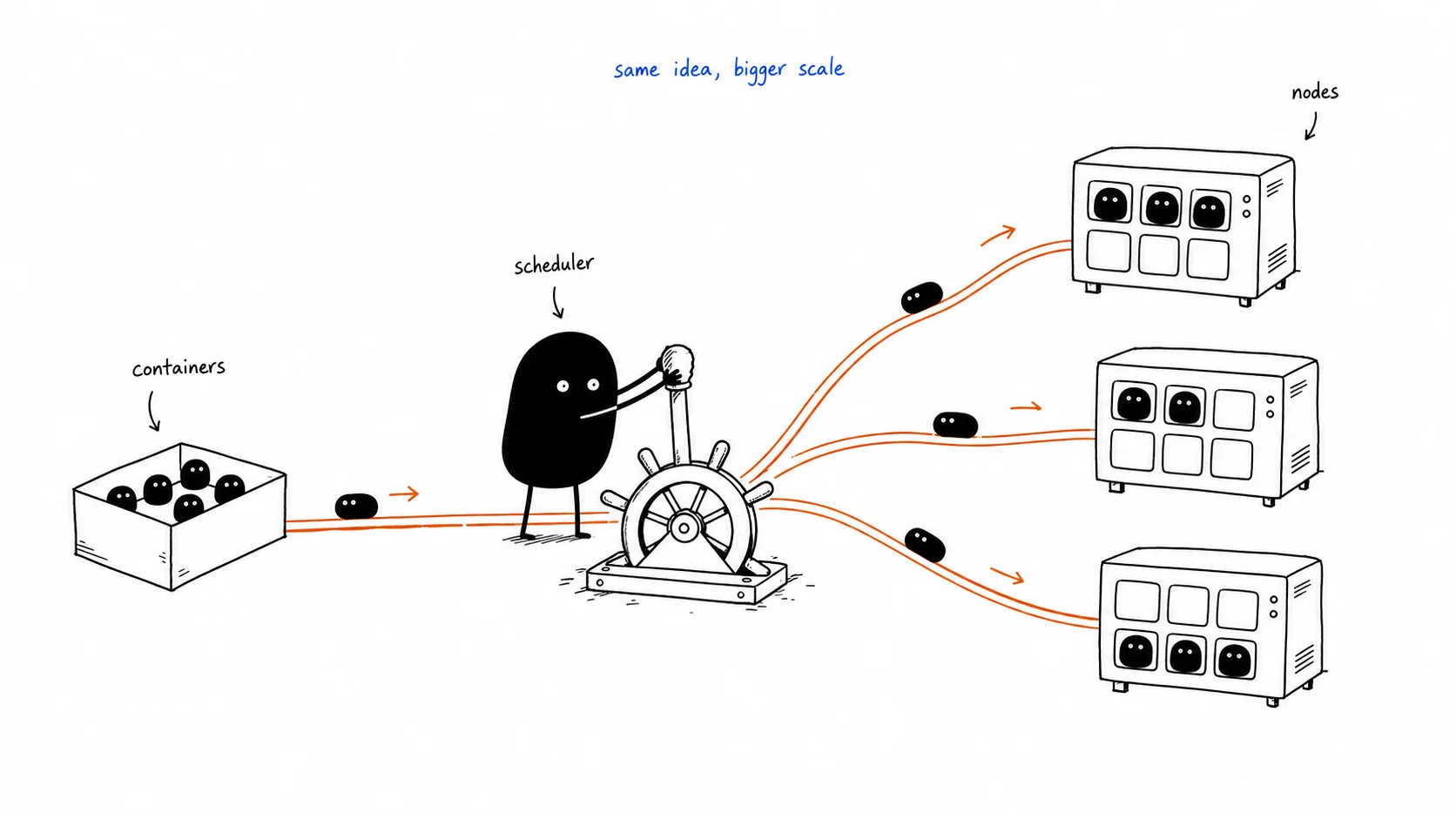
the way i finally understood kubernetes: Linux decides which process runs on which CPU core. kubernetes decides which container runs on which machine.
thats it. thats the whole thing.
you have a bunch of EC2 instances (called Nodes). kubernetes sits on top of them and acts like the OS scheduler, but instead of scheduling processes it schedules containers. you say “i want 4 copies of this app, each needs 0.1 CPU and 128MB RAM.” kubernetes looks at all your machines, figures out where there’s space, and places them. you never pick the machine yourself.
Cluster
├── Node 1 (EC2 t3.medium)
│   ├── pod: my-app
│   ├── pod: my-app
│   └── pod: some-other-service
│
├── Node 2 (EC2 t3.medium)
│   ├── pod: my-app
│   └── pod: some-other-service
pods are not VMs
multiple pods live on the same EC2. kubernetes packs them in based on available resources. not one EC2 per container. that would be insane and expensive.
the thing that confused me early was thinking kubernetes replaces EC2. it doesnt. you still pay for the EC2. kubernetes just manages what runs on them. the Node is the machine. the Pod is the process on that machine.
i wouldnt have used it for one app
the docker compose sweet spot
before i understood this, i thought kubernetes was just “the serious way to deploy things.” like if you were a real company you used kubernetes.
thats wrong.
for one app, one team, under a few thousand users. SSH into a server and run docker compose. $15/month on Hetzner. done. no ops overhead, no YAML files, no control plane to think about. i wouldnt touch kubernetes for that.
where it starts making sense
the moment kubernetes pays back is when you have multiple teams deploying to the same infrastructure. that was the unlock for me.
imagine two teams sharing one EC2. Team A runs a Go API. Team B runs a Python ML job that processes audio files. both are in the same docker-compose.yml. both teams SSH into the same server.
Team B’s job kicks off, saturates the CPU. Team A’s API starts timing out. Team B does a docker compose up and accidentally restarts Team A’s containers because they touched the shared file. Team A needs to upgrade their runtime, breaks Team B’s Python environment.
theres no real fix for this at the docker compose level. its just coordination overhead that compounds as you add more services and more people.
resource limits that are enforced
kubernetes solves this by making resource limits a hard kernel-level guarantee:
resources:
  limits:
    cpu: '2' # Team B's job physically cannot take more than this
    memory: '4Gi'
Team B can peg their 2 cores at 100%. Team A’s pods on their own CPU budget dont feel it. the isolation is real, not a gentleman’s agreement. the kernel enforces it.
the part that matters for teams
independent deploys
beyond resource isolation, the thing i found most valuable was that teams stop coordinating deploys.
on a shared server, deploying is a coordination problem. “are you deploying right now? cool, ill wait.” that gets old fast. on kubernetes, each team owns their own Deployment object. they push to their repo, their CI updates their image tag, their pods roll out. nobody elses pods are touched. Team A and Team B can both be deploying at the exact same time to the same cluster and it just works.
namespaces are real walls
namespaces make team ownership clean. Team A gets namespace api, Team B gets namespace ml. kubernetes RBAC means Team B literally cannot delete Team A’s deployments. the API server rejects it. not “please dont,” but actually rejected.
cluster
├── namespace: api   ← Team A owns this, full access
├── namespace: ml    ← Team B owns this, full access
└── namespace: infra ← platform team only
on a shared EC2 this boundary doesnt exist. anyone with SSH access can kill anything. namespaces replace that honor system with an actual access control layer.
services find each other without hardcoding IPs
one more thing that clicked: service discovery. on a plain EC2, if the ML service needs to call the API, you hardcode the IP. the IP changes, everything breaks.
in kubernetes every Service gets a stable internal DNS name automatically. api-service.api.svc.cluster.local. doesnt matter which Node the pod is on, how many replicas there are, or whether pods have been replaced. the name stays the same. services just call each other by name.
blue-green deployment made sense immediately
why rolling updates are risky
rolling updates (k8s default) replace pods one at a time. during the transition youre running v1 and v2 simultaneously. if your DB migration renames a column, v1 breaks because v2 already renamed it. mixed versions sharing a database is dangerous and the window where both are running is hard to reason about.
how blue-green works
blue-green is a cleaner model. you run two full environments at once. only one takes traffic. the switch is a one-line change to which label the Service selector points at.
Service selector: slot=blue   → all traffic hits v1
                               v2 is fully running but idle

run your smoke tests against v2 directly

Service selector: slot=green  → all traffic hits v2 (takes ~1 second)
                               v1 still running for instant rollback
rollback is just flipping the selector back. one command. one second. no re-deploying, no rebuilding. i found this much easier to reason about than “hope the rolling update doesnt mix bad versions.”
once youre confident v2 is stable, scale v1 down to zero. next deploy, v1 becomes the new green. it alternates.
the $70/month thing is a trap
what EKS charges for
EKS (AWS managed kubernetes) charges $70/month just for the control plane before you add a single EC2 node. for a side project or early-stage app that makes no sense.
that $70 isnt the cost of kubernetes. its the cost of not managing the control plane yourself. kubernetes is open source. you can run it on any Linux server for free.
what id use
k3s on a Hetzner VPS is where i’d start. k3s is a lightweight kubernetes distribution, one command installs it on any Linux server. Hetzner is $5-15/month. real kubernetes for the cost of a Netflix subscription.
# full k8s cluster on any Linux server
curl -sfL https://get.k3s.io | sh -
GKE on Google Cloud if i wanted managed. Google doesnt charge for the control plane. you only pay for the compute pods actually consume. for small workloads dramatically cheaper than EKS.
k3d locally for learning without any cloud cost at all. k3s inside Docker, runs on your laptop.
brew install k3d
k3d cluster create myapp
kubectl get nodes   # works immediately, zero cloud spend
multi-region was the other thing that clicked
you cant optimize away physics
i was thinking about deploying to both the US and India. a server in the US will always be ~200ms away from India. speed of light. you cant benchmark your way out of it.
the only fix is running the server closer to the user. two clusters: one in Virginia, one in Mumbai. Cloudflare GeoDNS routes Indian users to the Mumbai cluster automatically. they never know two clusters exist, they just get ~20ms instead of 1 second.
the database is the hard part
the app itself is easy to replicate. stateless Go binary, just run it in both regions. the database is where it gets complicated.
the pattern that works: one primary postgres in the US, one read replica in Mumbai. Indian users read from the local replica (fast). writes still hit the US primary. thats ~200ms for Indian users on writes. the physics tax you cant avoid.
for static files (React app, JS, CSS) a CDN solves it completely. Cloudflare caches them in 200+ locations. an Indian user loads the frontend from a Mumbai edge node in ~5ms.
kubernetes doesnt solve the geo problem itself. it just makes it easy to deploy identical workloads to multiple regions from the same YAML files.
nobody manually applies YAML in prod
terraform for infra
the last thing that clicked was how all of this is operated. nobody SSHs into a cluster and runs kubectl apply. thats just a different version of the same chaos.
Terraform provisions the infra. cluster, database, DNS records, VPC. all declared as code, versioned in git. terraform plan shows exactly what will change before you touch anything, like a git diff for your cloud.
helm for app config
Helm templates your kubernetes manifests. same Deployment spec works for staging and prod, just different values. replicas: 1 for staging, replicas: 4 for prod. one chart, multiple environments, zero duplication.
argocd closes the loop
ArgoCD runs inside the cluster and watches your git repo. push a change, ArgoCD detects it, applies the Helm chart. if someone manually kubectls something that doesnt match git, ArgoCD reverts it. git is the source of truth and the cluster enforces it.
git push
  → CI builds image, pushes to registry
  → CI updates image tag in values.yaml, commits
  → ArgoCD detects the change
  → ArgoCD runs helm upgrade
  → pods roll out
you push code. five minutes later its in prod. nobody ran a single manual command. thats the version of kubernetes that makes sense to me.
written after a few hours of actually mapping kubernetes to things i already understood instead of reading docs