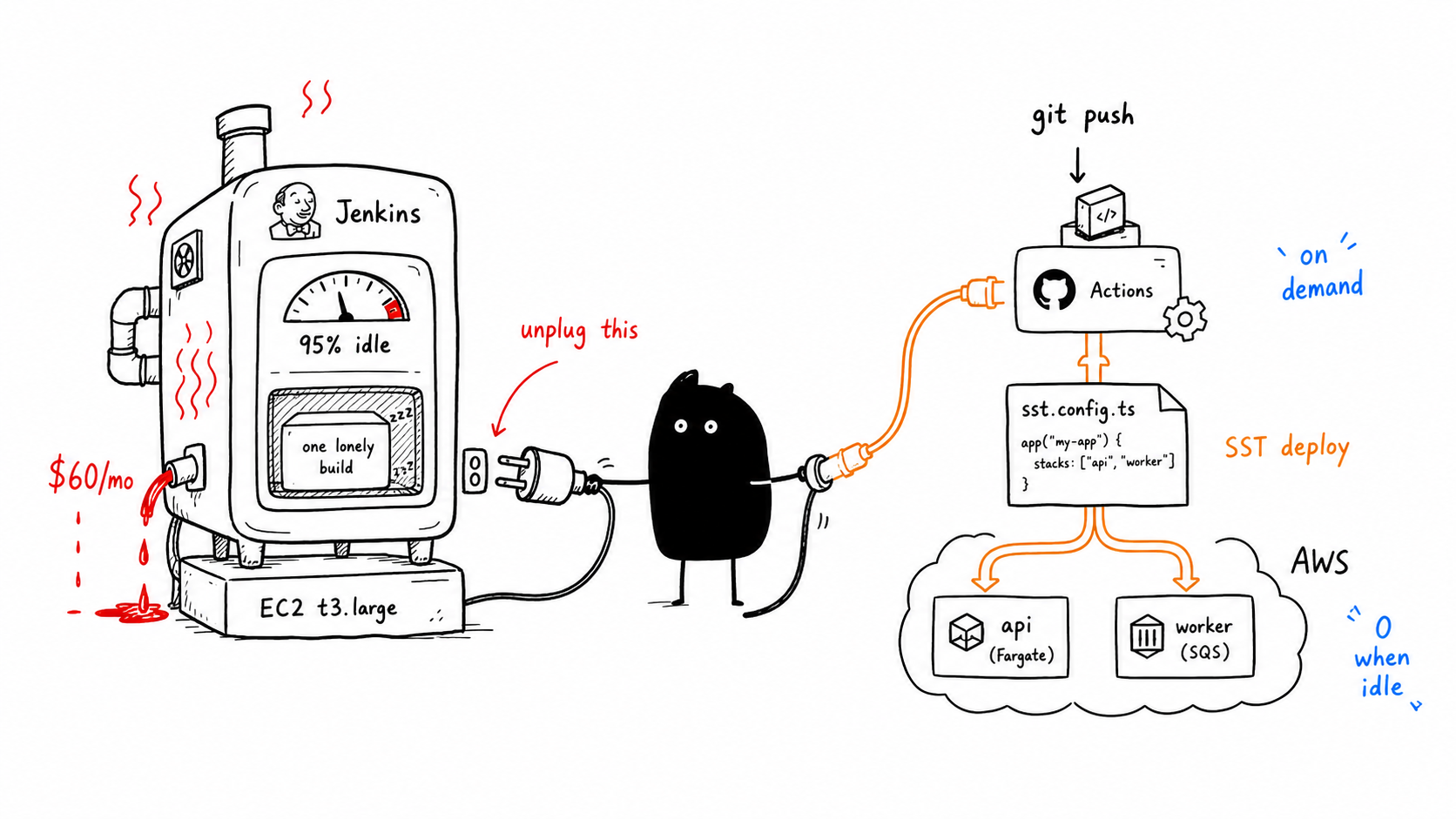
$60/month. a t3.large instance. running 24/7. doing builds maybe twice a day.
thats not infrastructure. thats a heater.
what they had
the client had jenkins on a t3.large EC2 instance. $0.0832 per hour in us-east-1. 720 hours in a month. $59.90 flat, whether they deployed once or a hundred times.
the machine sat idle 95% of the time. when it did run a build, it was still slow. upgrading to a bigger instance wouldve cost more. the whole thing was a trap — pay more for speed you only need during builds, or pay less and wait.
before calling me, they tried the middle ground. spin up a build instance on demand, stop it when done. sounds clever in theory. in practice its just manual toil. every time there was a deploy, someone had to start the server, wait for it, run the build, stop it. every time. breaks the minute you have multiple deploys in a day.
when your deploy process violates DRY, you know something is wrong.
why jenkins makes no sense at this scale
jenkins is a platform. it expects to be the center of your CI/CD — multiple pipelines, multiple teams, plugins, agents, the whole thing. its not wrong. its just built for orgs that have enough throughput to justify a dedicated build server.
they had one app. two services (api + worker). maybe two deploys a day.
if you arent using it 24/7, if you arent running pipelines for multiple repos, if your jenkins instance sits around consuming CPU credits doing nothing — you are paying for idle. renting a car and leaving it in the driveway 23 hours a day.
what replaced it
sst. one file. thats it.
sst is a framework for deploying full-stack apps on your own AWS account. it sits on top of Pulumi and Terraform, but instead of making you define raw cloud resources, it gives you high-level components — sst.aws.Vpc, sst.aws.Cluster, sst.aws.Service — that handle the boilerplate. you write TypeScript, not YAML. you describe your app, not your cloud.
it supports next.js, astro, remix, nuxt, sveltekit, express, hono — basically every framework. for our use case (containerized node services), we used the cluster + service pattern. if you’re deploying a next.js app, there’s a dedicated sst.aws.Nextjs component that handles the whole thing.
export default $config({
  app(input) {
    return {
      home: 'aws',
      name: 'backend',
      protect: input.stage === 'production',
      removal: input.stage === 'production' ? 'retain' : 'remove',
    };
  },
  async run() {
    const vpc = new sst.aws.Vpc('CoreVpc');
    const cluster = new sst.aws.Cluster('CoreCluster', { vpc });

    new sst.aws.Service('AppService', { cluster /* ... */ });
    new sst.aws.Service('WorkerService', { cluster /* ... */ });
  },
});
vpc. cluster. app service. worker service. health checks. load balancer. environment variables pulled from AWS Secrets Manager. all in one file.
no clicking through the AWS console. no remembering which security group was for what. no “someone set this up two years ago and nobody knows how it works.”
infra as code without the pain
terraform needs modules, state files, providers, backends. its powerful. its also a part-time job for a small team. pulumi is similar — more flexible but still expects you to think in cloud resources.
sst is one config file. one command:
pnpm sst deploy --stage stagingneed a staging env? --stage staging. production? --stage production. need the same infra in a different AWS account? swap the keys and run the same command.
during development, sst dev runs your infra in AWS while your app code runs locally — real cloud resources linked to localhost. no “works on my machine” because it literally works against real AWS.
the deploy is triggered by a github actions workflow. push to main → build → deploy. OIDC auth so there’s no access key to leak. manual dispatch for when you need to target a specific stage:
on:
  push:
    branches: [main]
  workflow_dispatch:
    inputs:
      stage:
        description: 'SST stage to deploy'
        required: true
        default: 'dev'
no jenkins. no idle EC2. no stopping and starting instances.
read more at sst.dev/docs .
what actually changed
| before | after | |
|---|---|---|
| build server | t3.large (always on) | CodeBuild (on demand) |
| monthly cost | ~$60 | $0 when idle |
| deploy command | log into Jenkins, click build | git push |
| staging env | manual setup | --stage staging |
| config | Jenkins UI + AWS console | one sst.config.ts |
| new AWS account | weeks of config | swap keys, one command |
| infra docs | whatever someone remembers | the code is the docs |
the build got faster too. CodeBuild spins up a fresh container, runs the build, done. no instance to maintain, no disk to clean up, no “jenkins ran out of space again.”
when you actually need jenkins
jenkins is the right tool when you have dozens of pipelines across multiple repos and teams, custom plugins that do real work, a full-time person managing it, and the throughput to keep it busy.
they had none of those things. they didnt need jenkins. they needed a build step and a deploy command.
the real lesson
there is a pattern here — same one from the kafka post. teams pick tools based on what sounds professional, not what fits the actual scale.
jenkins is a serious CI/CD platform. sst is a framework for deploying serverless apps. one sounds like enterprise infra, the other sounds like a developer convenience. but at their scale, the “convenience” tool did everything they needed at zero idle cost, and the “serious” tool was just a money fire.
stop paying for infrastructure that sits around waiting for you to use it. if your CI/CD tool costs money when nobody is deploying, you dont have CI/CD — you have a subscription to a compute habit.
thats it.