you sit down at someone else’s machine and try to work. default terminal. no tmux. they’re clicking around in VS Code, cd-ing through directories like it’s 2009. you try to not be that guy. but you are that guy. because your setup is just better.
i’m not saying this to be polite. i’m saying it because every time someone watches me work they ask “wait, how did you do that?” and i realize most devs are running on defaults.
the project switcher
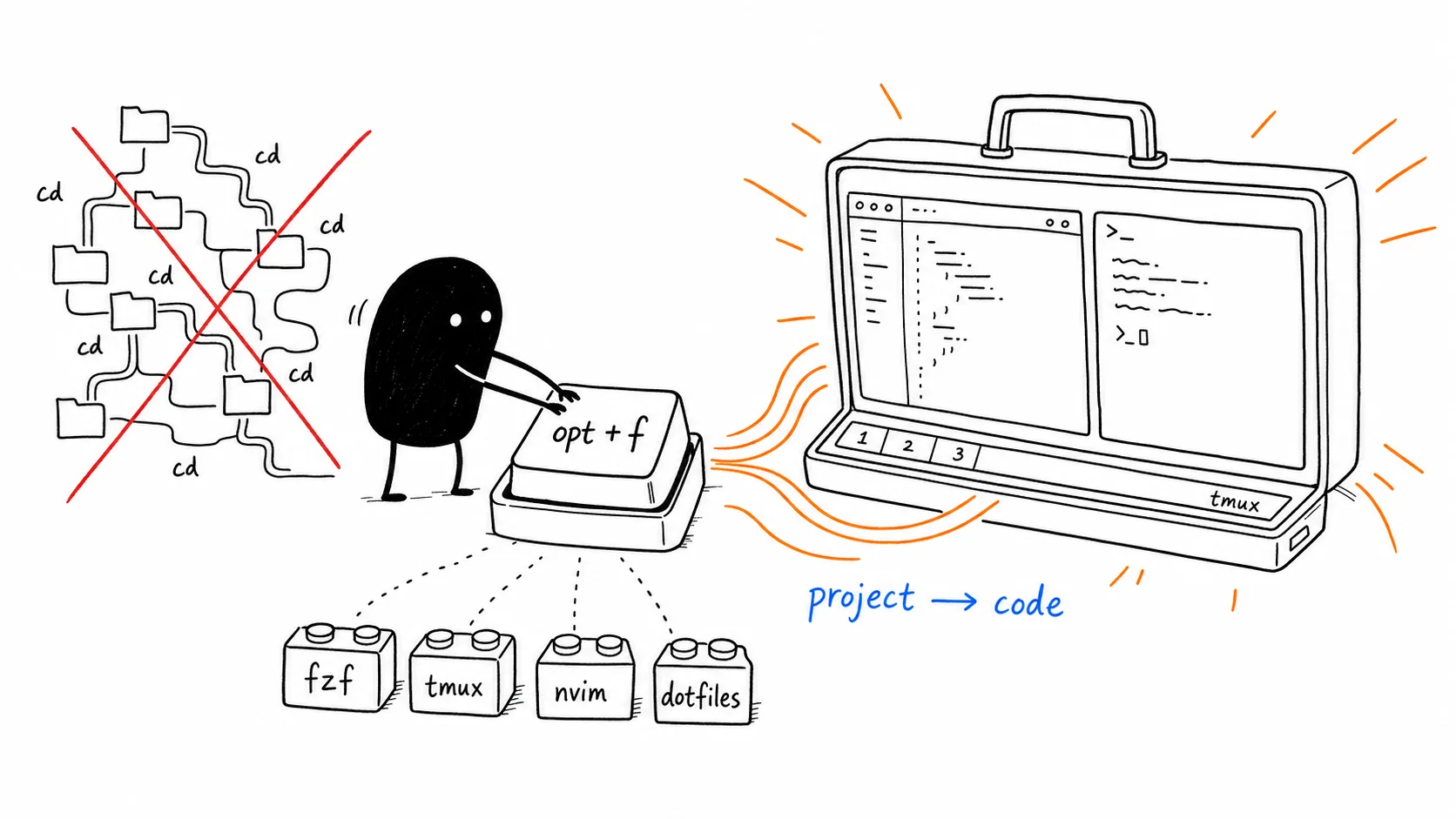
here’s the centerpiece: i press ⌥+f. fzf pops up. it’s scanning multiple project roots — ~/ghq at depth 3 (because go modules nest deep), ~/Desktop/p for personal stuff, ~/Desktop/w for work, ~/.config for dotfiles. i type two characters. enter. that’s it.
what happens next is the thing i stopped noticing years ago but everyone who watches me work asks about. if tmux isn’t running, it fires up a new session with two windows. window 1 has neovim already open at the project root. window 2 is a fresh terminal, sitting at the project root, waiting for bun dev or pnpm dev or whatever random command i feel like running.
the script is called tmux-sessionizer. it’s a 200-line bash script i found and customized. it reads from a config file where i define which directories to search and how deep. ~/ghq:3 means “scan ghq, go 3 levels deep, find anything with a .git folder.” ~/Desktop/p:2 is shallower because personal projects are flatter. this matters — you don’t want fzf showing you node_modules or dist folders. the depth config is the difference between “this is fast” and “why is this lagging.”
the session naming is automatic. pick a folder called stop-reaching-for-kafka, you get a tmux session called stop-reaching-for-kafka. pick it again later, it attaches to the existing session. no thinking. no tmux ls, no tmux attach -t whatever. just ⌥+f, pick, you’re in.
and if i’m already inside tmux and want to jump to another project? same shortcut. switches the client. zero friction.
why is this even a debate?? every dev i meet is still manually cd-ing and opening nvim and starting a second terminal. every. single. time. they switch context. 20 times a day. that’s not productivity — that’s ritualized suffering.
the terminal is not an afterthought
most devs install iTerm2, maybe change the font, and call it a day. the terminal is where you spend 8 hours. treat it like a first-class editor.
i use Kitty. FiraCode Nerd Font at size 18. beam cursor with a 1px trail — looks like a tiny lightsaber when you move. background blur at 95% opacity, 25px blur radius. titlebar hidden. no audio bell because why would i want my terminal screaming at me. scrollback at 20,000 lines because sometimes you need to scroll way back to that error from 3 hours ago.
inside the terminal: fish. not bash. not zsh. fish. it ships with autosuggestions and syntax highlighting built in — no plugin manager, no 200-line config, just works out of the box. fzf for fuzzy-searching everything. zoxide so i never cd — i just z and it knows where i meant.
the prompt? starship. minimal. shows username in purple, directory in blue, a green $ at the end. no git branch clutter. no 3-line prompts eating half my terminal. fish does most of what you need natively so you don’t need a plugin framework on top of your shell.
the terminal title bar shows parent-folder/current-folder. not the full path. not “Terminal” or “fish”. i wrote a small fish hook that calculates this on every directory change. when you have 7 tmux windows open, “Terminal” in the title bar is useless. ghq/my-project is not.
the tmux config people actually lean over to look at
tmux without config is unusable. tmux with oh-my-tmux is someone else’s opinion. mine is mine.
prefix is ^+/. not ^+b. / is right next to right-shift. one finger. try it for a week and then tell me ^+b is better.
pane navigation is vim: h left, j down, k up, l right. no awkward ^+b then arrow keys.
new windows open in the current directory. always. new-window -c "#{pane_current_path}". every terminal emulator gets this wrong by default.
^ + / | splits vertical. ^ + / _ splits horizontal. these are the tmux defaults people remap anyway, so i just did it.
the status bar is simple: green background, black text, shows window numbers and names. no clock. no hostname. no battery percentage. i don’t need my terminal to be a dashboard.
window renaming is automatic. tmux grabs the current folder name and uses it. ghq, personal, config — i always know where i am.
the one that gets people: ^+/ z doesn’t zoom the current pane. it zooms the other pane. so if i’m in nvim and need to see the terminal output fullscreen, i hit one key. hitting it again restores. small thing. massive quality of life.
dotfiles are infrastructure
my dotfiles live in chezmoi. they’re version controlled, templated, and installable with one command. sh install.sh and 30 seconds later the machine feels like mine. github.com/Chandraprakash-Darji/dotfiles — go look if you want the actual configs.
what’s in there: fish config, tmux config, tmux-sessionizer config, nvim (LazyVim with lazy.nvim), kitty, ghostty, wezterm (i’ve hopped terminals, the configs stay), aerospace window manager, starship, even firefox userChrome CSS that makes it look like arc browser.
aerospace is the mac window manager i settled on after trying yabai and amethyst. workspaces 1-5 on alt+1 through alt+5. gaps at 10px. tiles by default. no mouse needed.
the point isn’t that you should copy my setup. the point is that you should have a setup. something you built piece by piece over years. one alias you kept. one keybinding you borrowed from someone else. one config that survived three terminal emulators.
it’s not the tools, it’s the seams
a good dev setup isn’t about having the flashiest terminal or the most plugins. it’s about the seams between things not hurting.
⌥+ f to switch projects. nvim is already open. the terminal is already there. you don’t think about it. you just start working.
that’s the bar. not “look at my neofetch.” not “i use arch btw.” just: can you move from idea to typing code without friction?
if you can’t, your setup needs work. start with one thing. change the prefix key. write the alias. install fzf. build it slow. don’t copy someone’s dotfiles wholesale — understand what you’re adding and why.
mine took years. it’s not done. but it’s better than yours.